All work

Case Study · Product Discovery

CellFindr®

Designing a guided discovery system for a complex B2B bioscience marketplace — from initial definition through continuous optimization.

Role

Senior UX Strategist & Product UX Lead

Scope

End-to-end: Research → System → Execution

Duration

Ongoing — initial definition to continuous iteration

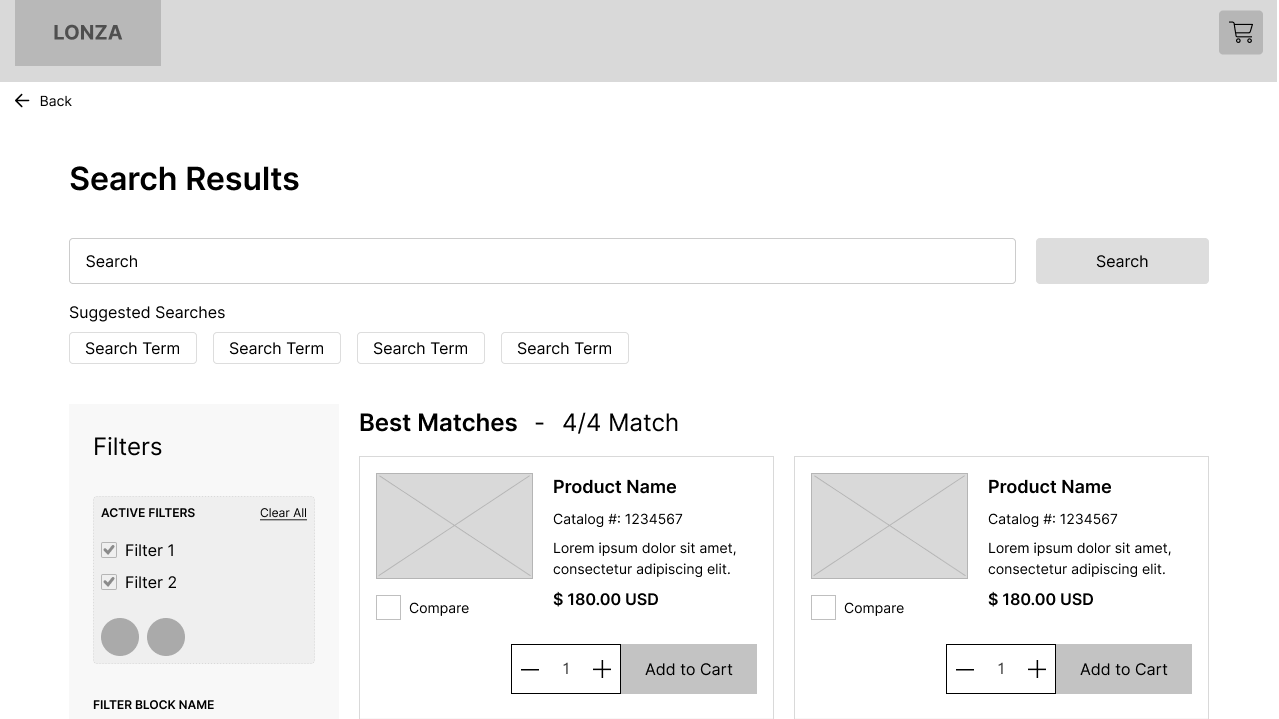
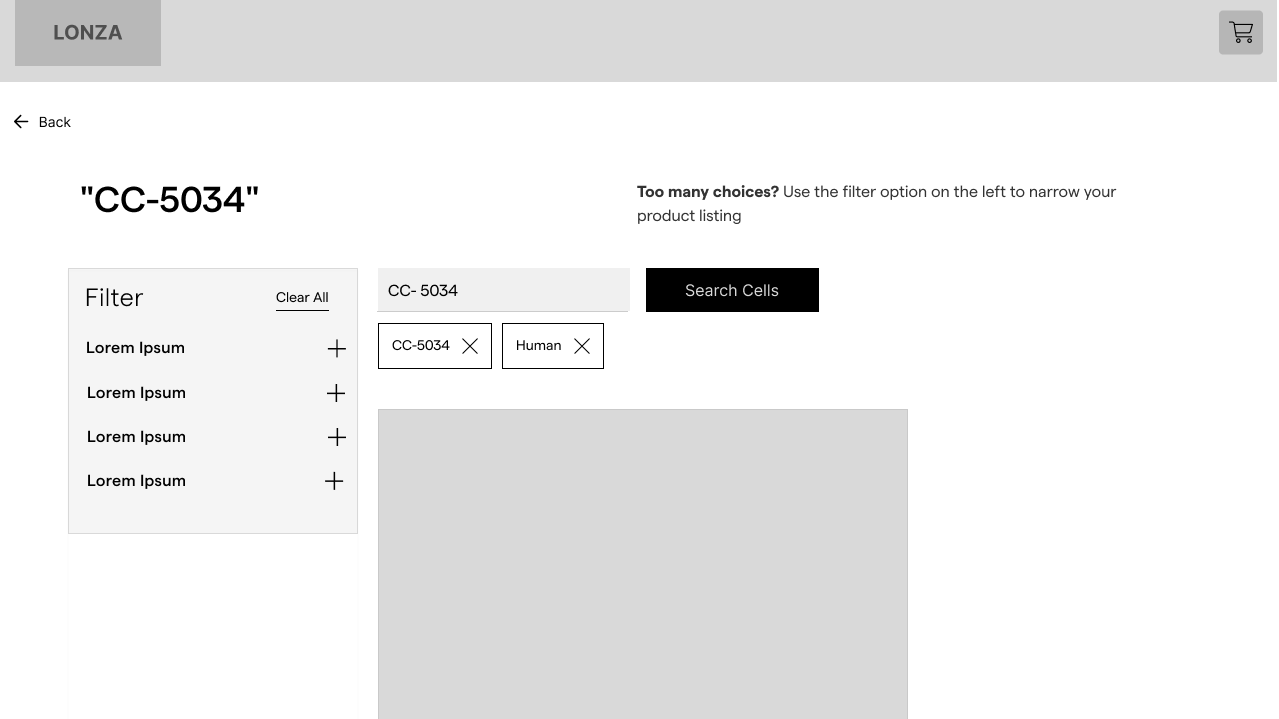
Initial Configurator (v1)

Evolved CellFindr System (v2)

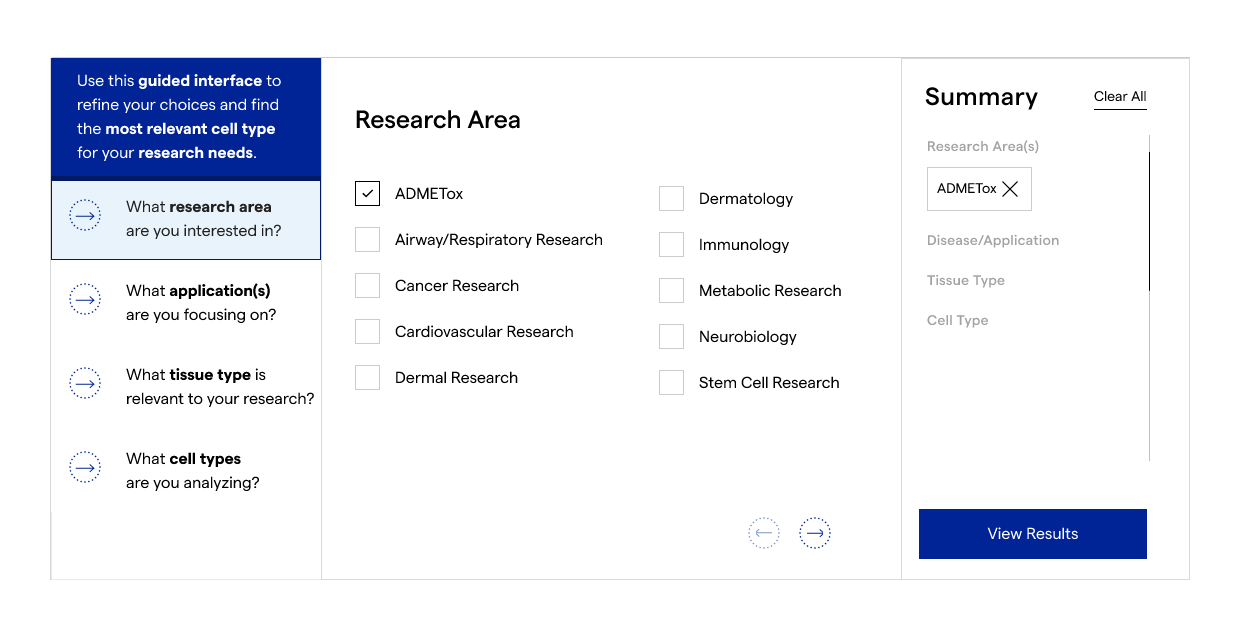
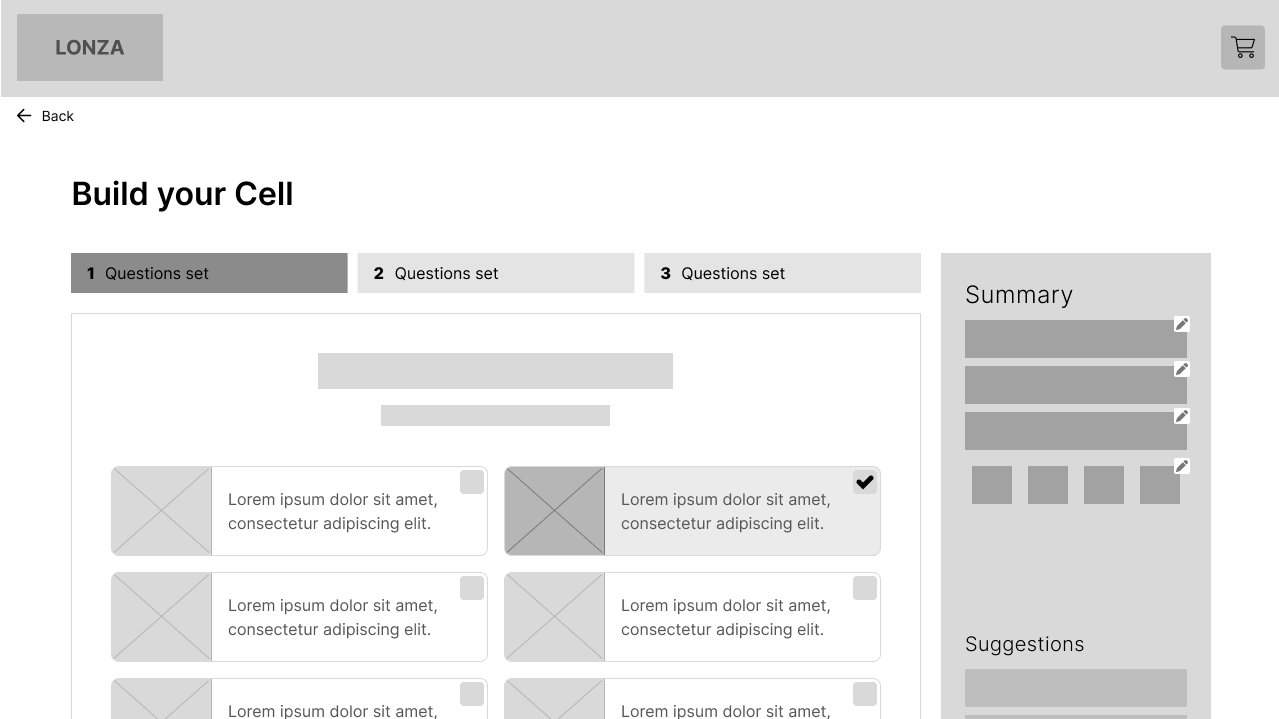
Guided configurator enabling structured research selection with real-time summary validation.

Selection  →  Results (PLP)  →  Configuration (PDP)

01

A specialized tool for a complex market

CellFindr® is a product discovery platform built for researchers and procurement specialists navigating a highly technical bioscience catalog. Users range from early-career lab technicians making first-time purchasing decisions to experienced scientists with precise, protocol-specific requirements.

The catalog spans thousands of SKUs across cell lines, reagents, and assay systems — each with meaningful distinctions in specification, compatibility, and application context. The discovery problem isn't search — it's structured guidance through complexity.

02

Users were losing confidence before reaching a decision

Existing discovery pathways were built around catalog logic, not user behavior. The result was high drop-off, repeated sessions without conversion, and a support load driven by questions the interface should have answered.

  • Navigation friction: Users couldn't orient themselves within the catalog — there were too many entry points, none clearly scoped to task type.
  • Specification overload: Product pages surfaced technical data without progressive disclosure — forcing users to self-filter without enough context to do so confidently.
  • No summary state: Users had no way to review selections holistically before committing — leading to abandoned sessions and repeat visits.
  • Split user modes: Expert users wanted direct search with faceted filtering. Novice users needed guided, question-led pathways. One interface was failing both.
  • No continuous loop: Post-launch analytics were not connected back to UX decisions — the experience was static while user behavior evolved.

03

UX ownership across the full lifecycle

I led the UX strategy and design from initial scoping through post-launch iteration. This wasn't a handoff engagement — I maintained direct ownership of the experience across multiple release cycles.

  • Defined the research plan and ran discovery with researchers, procurement leads, and internal SMEs
  • Synthesized findings into a behavioral model and system architecture
  • Designed the dual-path discovery model — guided exploration and precision search — as a single coherent system
  • Partnered with development on front-end fidelity and interaction implementation
  • Built the continuous improvement framework connecting analytics signals to UX iteration cycles

04

Understanding User Behavior

Two distinct modes. One system.

Research surfaced a clear behavioral split that wasn't reflected in the existing interface. Rather than designing for an average user, I mapped two distinct modes — and designed both as first-class pathways.

Guided Explorer

EntryBrowses from category or research area
NeedOrientation and confidence before committing
FailureToo many options with no contextual framing
TriggerA validated shortlist they can trust

Precision Searcher

EntryArrives with a spec or catalog number in hand
NeedSpeed and direct match, no unnecessary steps
FailureHidden filters, noisy results, no confirmation
TriggerExact match with specification confirmation

This behavioral model became the foundation for all subsequent design decisions — not just navigation, but information architecture, filtering behavior, and the structure of the summary state.

Defining the System

Dual-path model — not two products, one system

The core design challenge was building two distinct entry modes that shared a coherent underlying architecture. Users needed to be able to move between modes without feeling like they'd changed products.

Path A  ·  Guided Exploration

Research Area
Application Type
Product Category
Filtered Results

Shared

Summary State

Path B  ·  Precision Search

Direct Query
Faceted Filtering
Specification Match
Confirmation
CellFindr guided selection configurator interface
CellFindr product listing results page
CellFindr product detail page

Both paths converge at a shared summary state — a selection review panel that lets users validate their choices before committing. This was the most requested missing element in research, and became the clearest differentiator in the final experience.

Designing the Experience

Structure before polish

Wireframing prioritized flow integrity over visual detail. Early rounds were tested with users in low-fidelity to validate navigation logic and the transition between modes — before committing to visual design.

Key interaction principles carried through from wireframe to final UI: always show where you are, always show what you've selected, and never force a dead end — every state had a clear path forward or back.
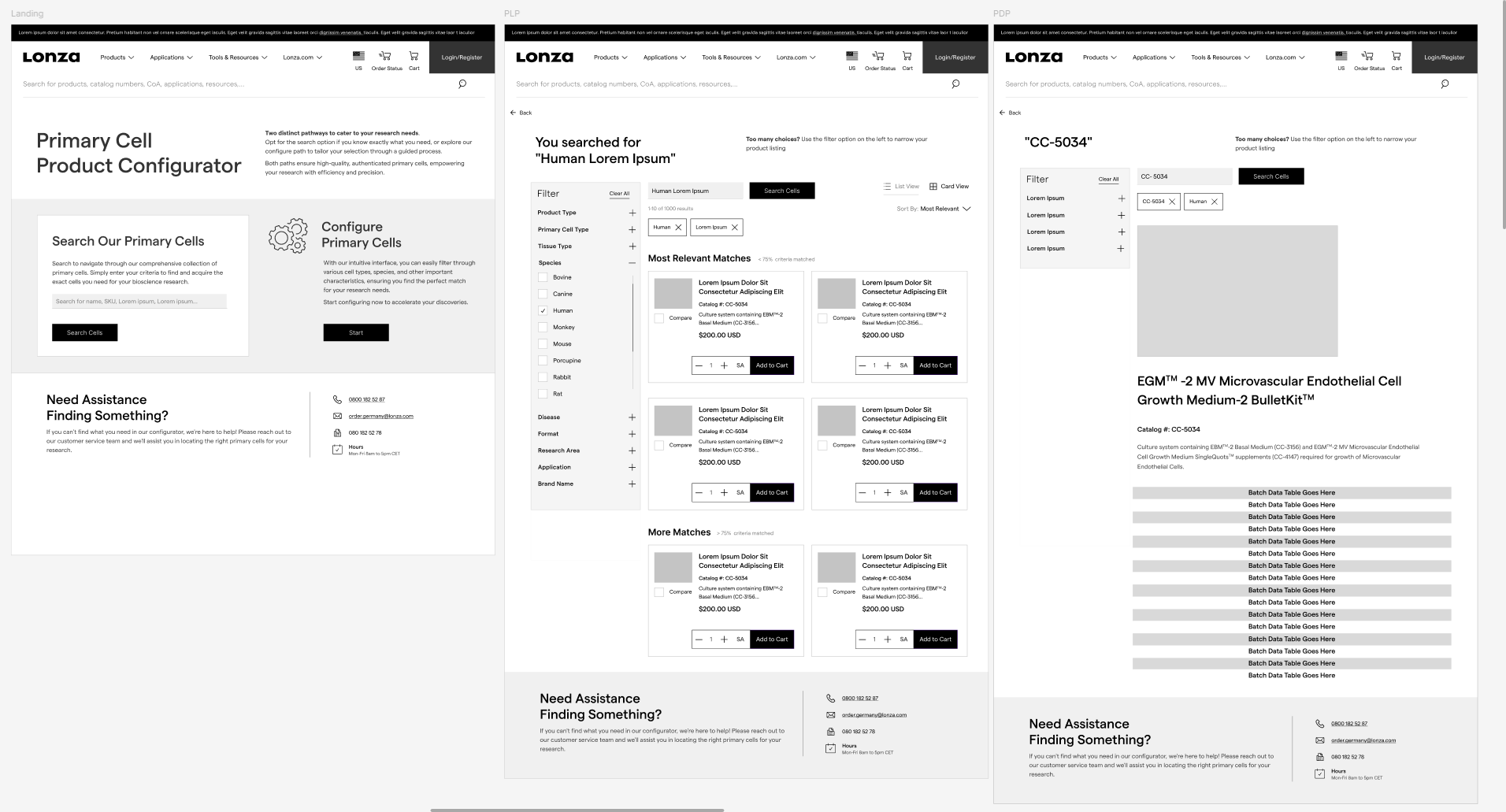
System-level wireframes showing the end-to-end flow from guided discovery through product selection and final configuration

System-level wireframes mapping the end-to-end flow from guided discovery through product selection and final configuration.

Exploration & Early System Thinking
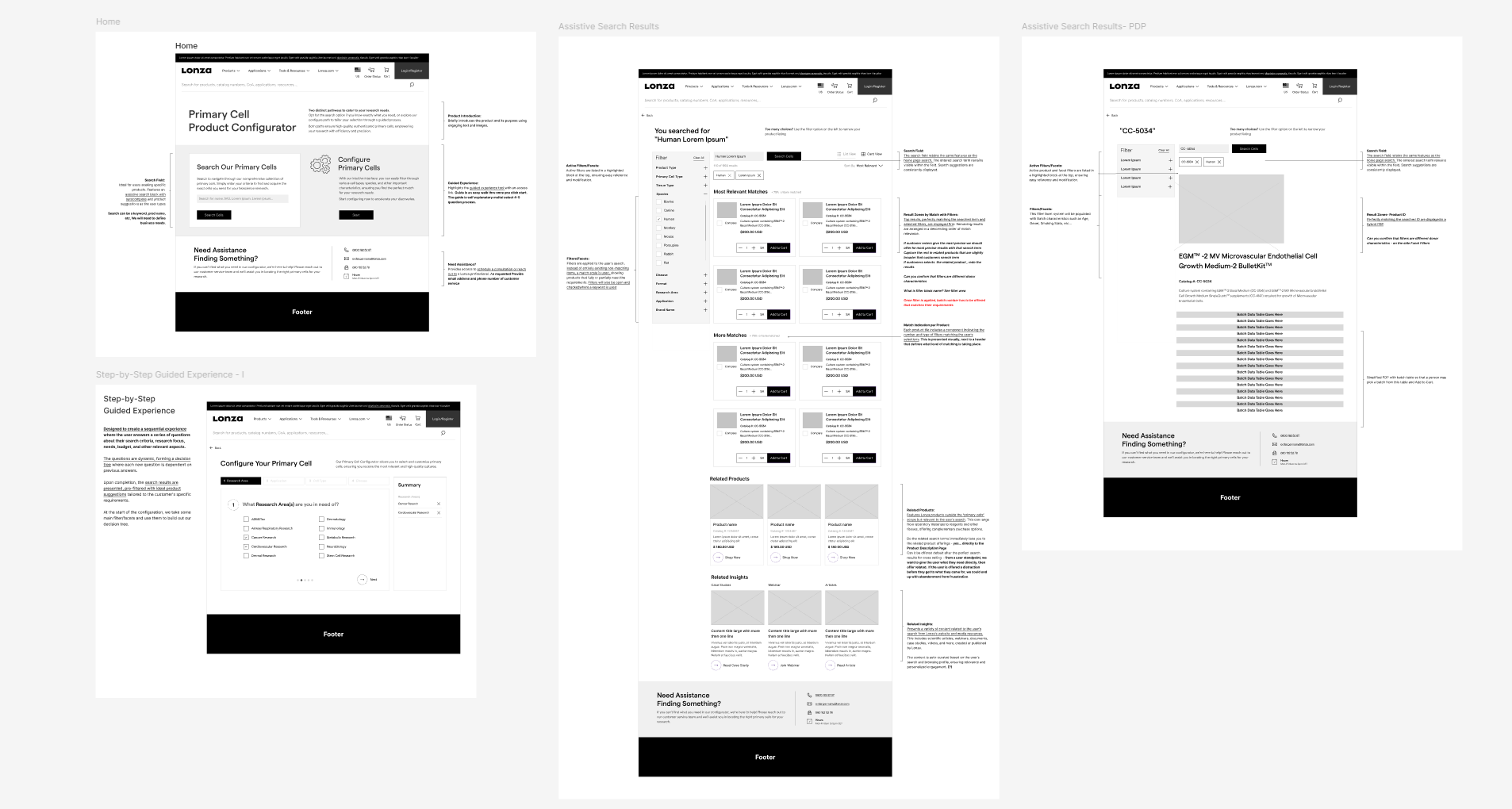
Early wireframe exploration showing multiple entry points, guided flows, and system relationships

Early wireframes explored multiple entry points, guided flows, and system relationships before converging on a structured dual-path model.

Core Design Principles

01

Always show where you are

Persistent step context and research area framing throughout. Step indicators replace breadcrumbs — forward progress, not history.

02

Always show what you've selected

The summary panel is persistent and live — updating with each selection, always visible, always editable before committing.

03

Never create a dead end

Every state has a clear path forward or backward. No confirmation walls. Selections are removable at any point without resetting the session.

Continuous Improvement

Closing the loop between analytics and design

Post-launch, I built a lightweight continuous improvement framework — connecting behavioral analytics (drop-off by step, session replays, search query analysis) to a structured UX review cycle. Rather than waiting for a major redesign, small, evidence-backed iterations shipped on a regular cadence.

Post-launch refinement of summary panel
  • Defined key behavioral signals to monitor per pathway
  • Established a bi-weekly review rhythm with product and analytics stakeholders
  • Prioritized iterations using an effort-to-signal ratio rather than HiPPO input
  • Documented decisions and their data rationale to create a living design history
05

The calls that shaped the system

  1. Design for modes, not for an average user

    Behavioral research made it clear that a single unified interface was serving neither user type well. Committing to dual pathways meant accepting more design complexity in exchange for meaningful clarity at point of use.

  2. Persistent summary state as a first-class element

    Rather than a checkout-style review step, the summary panel became a persistent, always-visible element — allowing users to review and revise selections continuously, not just at the end.

  3. Progressive disclosure over full specification exposure

    Product specs are meaningful only in context. Surfacing full technical data upfront added cognitive load without helping users decide. A tiered disclosure model reduced abandonment at the product detail level.

  4. Invest in the continuous improvement infrastructure, not just the launch

    Allocating design time to the post-launch analytics and review framework paid dividends. The experience improved meaningfully through iteration — the launch was a foundation, not a destination.

  5. Keep paths architecturally unified

    Guided and precision modes share the same underlying data model and summary state. Users who switched modes mid-session didn't lose their selections — a small detail that proved significant in testing.

06

Measurable, grounded results

Outcomes were tracked from launch through iterative cycles. The numbers reflect the system-level impact of a research-led approach — not just interface polish, but structural change in how users navigate the catalog.

↑ 34%

Session-to-selection conversion across guided pathway

↓ 41%

Drop-off at product detail — post progressive disclosure implementation

↓ 28%

Support queries related to product selection — redirected to self-service

Post-launch metrics based on behavioral analytics and support ticket trends over the first 3 months.

Beyond metrics, the continuous improvement framework has allowed the team to maintain experience quality through catalog growth and product expansion — without requiring a full redesign cycle.

07

"The hardest UX problem isn't designing the right interface — it's designing the right system to know when the interface needs to change."

CellFindr taught me that the most durable design work happens at the system level. The dual-path model wasn't a clever UI pattern — it was a structural response to a behavioral reality that the previous interface had ignored. And the continuous improvement framework wasn't a process add-on — it was the mechanism that kept the design relevant as the product grew.

The work that had the most lasting impact wasn't the initial design. It was the framework built to keep improving it.

These initial improvements led to a broader continuous improvement initiative focused on scaling insight-driven design decisions across the product.